Compress PDF Extreme
The smallest PDF you can get while small print still reads correctly. Free extreme compression, no sign-up, no watermark.
Scanned document? Choose Black & white scans below. Together with Extreme it gives by far the smallest file, and printed text usually reads more cleanly than the original.
Your PDF is sent over an encrypted connection and compressed on our server. The working copy is deleted as your download is sent, and nothing is kept.
People also use
Extreme compression, measured
To see what it really takes to compress PDF extreme small, we ran seven kinds of document through the tool at Recommended and at Extreme, in colour, grey and black and white. Every number here was measured, not estimated.
| Document | Original | Recommended | Extreme, colour | Extreme, grey | Extreme, black & white |
|---|---|---|---|---|---|
| 1-page PDF with one phone photo | 987 KB | 38 KB | 21 KB | 20 KB | 20 KB |
| 1-page colour scan | 2.6 MB | 411 KB | 208 KB | 204 KB | 64 KB |
| 3-page colour scan | 4.3 MB | 684 KB | 354 KB | 340 KB | 97 KB |
| 12-page report with photos | 17 MB | 151 KB | 147 KB | 118 KB | 118 KB |
| 20-page text document | 22 KB | 16 KB | 16 KB | 16 KB | 16 KB |
| 120-page report with photos | 51.5 MB | 4.7 MB | 2.4 MB | 2.2 MB | 2.2 MB |
| 100-page colour scan | 77.3 MB | 25.3 MB | 12.7 MB | 12.3 MB | 3.5 MB |
Scans are where Extreme earns its name. A one-page colour scan went from 411 KB at Recommended to 208 KB at Extreme, and a hundred-page scan from 25 MB to 12.7 MB, roughly half each time, because every scanned page is a picture and Extreme resizes pictures harder.
With black and white on top, the numbers change completely. The same one-page scan came to 64 KB and the hundred-page scan to 3.5 MB, a twenty-second of its original 77 MB. For text documents that were scanned, this combination is the smallest the tool can make while the text still reads correctly.
Extreme is not always dramatic, and it is worth knowing when. The twelve-page report came to 151 KB at Recommended and 147 KB at Extreme, almost the same, because its pictures were already simple enough to compress well at either setting. A document made only of text barely changed at all. In those cases the file is already about as small as it can sensibly be.
How much smaller is Extreme than Recommended?
The same files, as a percentage. This is the honest answer to whether Extreme is worth choosing for your document.
| Document | Extreme, colour | Extreme, black & white |
|---|---|---|
| 1-page colour scan | 49% smaller | 84% smaller |
| 100-page colour scan | 50% smaller | 86% smaller |
| 120-page report with photos | 49% smaller | 52% smaller |
| 1-page PDF with one phone photo | 45% smaller | 47% smaller |
| 12-page report with photos | 3% smaller | 22% smaller |
| 20-page text document | no change | no change |
Second column: Extreme in colour. Third column: Extreme in black and white, where scanned pages become one-colour and photos turn grey. Percentages are against the Recommended result for the same file.
How to compress a PDF at Extreme
- 1
Add your PDF
Drop it on the box or click Select PDF files. The level is already set to Extreme, the strongest compression.
- 2
Choose Black & white for scans
If the document is a scan of printed text, pick Black & white scans under Colour. Keep colour for photos, stamps and anything where colour matters.
- 3
Press Compress
Large files show real progress, page by page, while the server works.
- 4
Compare before you keep it
Press Compare and zoom to 200 or 400 percent on small print and photos. Extreme should look clean at normal zoom.
- 5
Download
Take each file on its own, or all of them as one ZIP. The copy on our server is deleted as it is sent to you.
What extreme compression actually does
To compress PDF extreme small, it helps to know where the weight is. A PDF is made of text, drawings and pictures. Text and drawings are already compact, so almost all of the weight in a large PDF is in its pictures: photos from a phone, scanned pages, screenshots. Extreme compression works on those pictures only.
At the Extreme level every picture is resized to 100 dots per inch and saved again as a tighter JPEG. Scanned pages in black and white keep 150 dots per inch, because one-colour pixels need a little more resolution than grey ones to keep letters sharp. Fonts are trimmed to the characters the document uses, repeated images are stored once, and the file structure is rebuilt compactly.
What Extreme never does is turn your text into a picture. Many tools reach their smallest setting by flattening each page into one low-quality image, which destroys selectable text, links and bookmarks. Here the words stay real text: sharp at any zoom, searchable, and readable by software. When you compress PDF extreme small with this tool, only the pictures pay the price.
Why Extreme stops at 100 dpi
Most tools that compress PDF extreme small go down to 72 dpi, an old standard for computer screens. It makes files a little smaller again, and we tested it before deciding not to use it. The picture below is the same scanned agreement compressed both ways, shown at the same size.
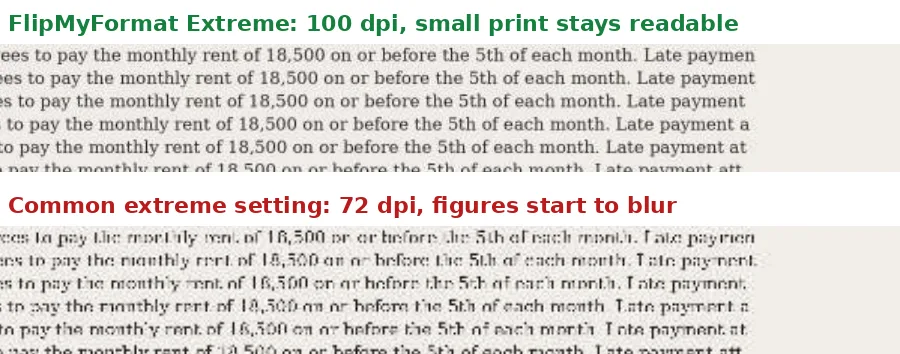
At 100 dpi the small print is clear and the figure 18,500 reads exactly as it should. At 72 dpi the letters break up and the same figure is easy to mistake for 16,500. On a rent agreement, a mark sheet or an invoice, that is not a cosmetic problem, it is a wrong number. So Extreme stops at 100 dpi for colour and grey, and at 150 dpi for black and white scans.
The difference in size is small. In our tests the 72 dpi version of a scanned page was only about a third smaller again than the 100 dpi one, and in black and white the readable version is already a fraction of the colour original. If you really need to go below the readable floor, the target size mode offers Go smaller anyway, with a clear warning.
Extreme plus black and white: the smallest scans
A scan is a photograph of paper. In colour, every pixel carries the tint of the paper, shadows from the scanner lid and a fine grain of noise, and all of that has to be stored. Black and white keeps only what matters for a page of text: ink or no ink.
Choosing Black & white scans converts only the pages that are scans, so a document that mixes typed pages and scanned pages keeps its real text exactly as it was. Photos on the typed pages turn grey rather than one-colour, so they stay recognisable.
The result is the smallest file this tool can make that still reads correctly. A one-page scan came to 64 KB, a three-page scan to 97 KB, and a hundred-page scan to 3.5 MB, and the text in each read more cleanly than in the colour original because the grey paper tint disappears. For certificates, agreements, forms and letters, this is the combination to use.
How much quality does Extreme cost?
Text costs nothing. In our tests every word on every page stayed in exactly the same place, and the text rendered identically, pixel for pixel, before and after compression. Links, bookmarks and the page order are unchanged too.
Pictures are where the saving comes from, and they do lose detail. We measured how similar each picture was to the original on a scale where 1.00 means identical: a phone photo scored 0.97 at Extreme, and the photos in a busy report 0.91. At normal zoom that difference is hard to see; zoomed in, fine textures in photos look softer.
If a document is mostly photos you care about, such as a portfolio or a property brochure, Extreme is the wrong choice; use Recommended or Less. If it is mostly text, forms or scans, Extreme is usually the best one, because nothing that matters gets worse.
Extreme or a target size?
When you compress PDF extreme, you get a fixed setting: the smallest readable version, whatever size that turns out to be. A target size works the other way round: you say the limit, such as 200 KB, and the tool finds the sharpest version that fits under it.
When a form or portal states a limit, a target is usually better, because it spends every kilobyte you are allowed on quality instead of stopping as small as possible. There are guides for the most common limits, from Compress PDF to 100 KB up to Compress PDF to 1 MB. When there is no stated limit and you simply want the lightest file, Extreme is the quickest choice.
Extreme compression for large PDFs
This extreme PDF compressor is also at its fastest at this level, because it has the least picture data to write. Our 120-page, 51 MB report took about 8 seconds at Extreme against about 19 at Recommended, and came out at 2.4 MB. The 100-page, 77 MB scan took about 8 seconds in colour and about 40 in black and white.
Large files run as a background job on our server, so there is no time limit to worry about and the progress bar shows what is happening, page by page. Each PDF can be up to 100 MB. When the job finishes and you download the result, the copy on our server is deleted as it is sent; anything not collected is deleted after ten minutes.
Extreme compression for email and chat
Most mail services accept attachments far larger than a compressed PDF, but size still matters. Large attachments are slow to send and open on a phone, eat into mobile data, and are often stripped or bounced by company mail filters. Chat apps compress photos on their own but send documents as they are, so a 20 MB PDF takes a long time to reach someone on a weak signal.
Extreme turns most everyday documents into files small enough to go anywhere instantly. A scanned letter in black and white is typically well under 100 KB, and a multi-page report with photos a few hundred kilobytes, while the text stays perfectly sharp on the recipient's screen.
Extreme compression for exam, job and government portals
Upload forms often reject anything above a tight limit, and applicants usually reach for the strongest compression they can find. Extreme is a good first try: certificates, mark sheets and identity proofs are mostly text and stamps, which is exactly what it handles best, especially with Black & white scans.
If the form states its limit, though, a target size is the better tool, because it keeps as much quality as the limit allows instead of going as small as possible. And check colour before you upload: if a stamp, seal or photo must stay in colour, keep colour and accept a slightly larger file rather than switching to black and white.
Why some PDFs stay large even at Extreme
Extreme shrinks pictures, so a PDF whose weight is somewhere else will not shrink much. Detailed vector drawings, such as architectural plans, maps and circuit diagrams, are stored as lines rather than pixels and stay the same size. So do PDFs that are already compressed well, and those made of plain text.
A few kinds of PDF are deliberately treated with care. Fillable forms are compressed losslessly so every field keeps working, which saves less. Digitally signed PDFs are returned untouched unless you choose Compress anyway, because any change invalidates the signature. And very long documents simply contain a lot of pages: at about 35 KB a scanned page in black and white, a 300-page scan cannot come out under a few megabytes and still be readable.
Extreme compared with other ways to shrink a PDF
Putting a PDF in a ZIP file saves only a few percent, because the pictures inside are already compressed, and many portals refuse ZIP files. Printing a document to PDF again, or exporting it as images, usually makes it larger and turns the text into pictures that cannot be searched.
Re-exporting from the original program with smaller images can work well when you have the source file, and it combines nicely with this tool: export at screen resolution, then compress PDF extreme to finish. Scanning again at 200 dpi in greyscale is the best fix for a scan that started out enormous.
Compress PDF extreme on your phone
Most people who need the smallest possible PDF are on a phone, about to attach a scan to an email or upload it to a form. The page works the same way in any mobile browser, with nothing to install: tap Select PDF files, choose the document from Files, Downloads or Google Drive, and press Compress with Extreme already selected.
The smaller PDF is saved to your phone, ready to attach. On a slow connection the upload is most of the wait, and the progress bar shows each stage, so you can see it working rather than guessing.
Extreme compression for a whole batch
When you need to compress PDF extreme small for a stack of files, such as a folder of scanned receipts or a set of application documents, add them all at once. Up to three are compressed at the same time, each with its own progress and result, and you can download them one by one or together as a single ZIP.
Every file in the batch gets the same care: signed PDFs are returned untouched, forms stay fillable, and any file that would not get smaller comes back as it was, with a note saying why.
Is extreme compression private?
Your PDF travels to our server over an encrypted connection, because proper extreme compression needs tools a browser cannot run. There it is processed as a short-lived job. When you download the result, the server deletes its copy as the bytes are sent, and anything that is never collected is deleted automatically after ten minutes.
There is no account, nothing is linked to you, and nothing is kept. That is how you can extreme compress PDF free here without trading your documents for it.
When to use Extreme, and when not to
Use Extreme for scanned documents, forms, letters, invoices and reports that are mainly text, for sending over email or chat on a slow connection, and for any portal that wants the smallest file possible. Add black and white for scans of printed text.
Avoid Extreme for anything you plan to print, for photo-heavy documents where the photos are the point, and for technical drawings with very fine lines. Print colours in a CMYK print file are also converted to screen colours at Extreme; the Less level keeps them. And if a PDF carries a digital signature, the tool returns it untouched, because compressing it would invalidate the signature.
If it is still too big
Add black and white
For scanned text this is by far the biggest step: roughly a quarter of the colour size, often less.
Use a target size
If a portal gives a limit, switch to Target size; for really tight limits it also offers Go smaller anyway.
Send fewer pages
Keep only the pages the reader needs with Extract Pages, then compress again.
Split the document
Break a long file into parts with Split PDF and compress each part at Extreme.
Start from a lighter scan
A new scan at 200 dpi in greyscale starts far smaller than a 600 dpi colour scan.
Before you send it
Read the small print
Open Compare and zoom in on figures, dates and names. At Extreme they should be perfectly clear.
Check the photos you care about
If a photo matters, make sure it still looks right, or use Recommended for that document.
Text can still be selected
Select a word in the result. If you can, search and screen readers work too.
No password unless intended
Protected PDFs keep their password when compressed. Many portals refuse them, so remove it with Unlock PDF first if needed.
Frequently asked questions
How do I compress a PDF extreme small?
Add your PDF on this page, where the level is already set to Extreme, and press Compress. For scanned documents choose Black & white scans first; together they give the smallest readable file.
Can I extreme compress PDF free of charge?
Yes. Extreme compression is free with no sign-up, no email, no watermark and no daily limit, and it works on batches too.
How much smaller does Extreme make a PDF?
It depends on what is inside. In our tests scans came out about half the size of the Recommended result, and with black and white up to 86 percent smaller. Documents that are mostly text barely change, because they are already compact.
Will the text stay readable?
Yes. Text is never turned into a picture, and pictures never go below 100 dpi, or 150 dpi for black and white scans. That floor exists because at 72 dpi small figures in scans start to blur.
Why not use 72 dpi like other tools?
Because at 72 dpi small print in scans misreads; in our test 18,500 looked like 16,500. A slightly larger file is better than a wrong number on an agreement or a mark sheet.
Can I compress PDF extreme free on my phone?
Yes. The page works in any mobile browser with nothing to install, and the smaller PDF is saved to your phone's Downloads or Files app.
Does Extreme work on scanned PDFs?
Yes, and that is where it helps most. Add Black & white scans and a one-page scan came to 64 KB in our tests, from 2.5 MB.
Is extreme compression the same as hyper compression?
They are names for the same idea: the strongest compression a tool offers. What differs between tools is whether text stays text and whether small print stays readable; here both do.
Will Extreme make my photos look bad?
At normal zoom they usually look fine, but fine detail softens when zoomed in. For photo-heavy documents where the photos matter, use Recommended or Less.
Can I compress PDF extreme to an exact size?
Extreme gives the smallest readable version, whatever size that is. For an exact limit such as 100 KB, switch to Target size, which keeps the most quality that fits.
How large a PDF can I compress?
Up to 100 MB per file. Large files run as a background job with a progress bar, so there is no time limit.
What happens to digitally signed PDFs?
They are returned untouched, because compressing would invalidate the signature. If you do not need the signature, you can choose Compress anyway.
Does Extreme keep links, bookmarks and forms?
Links, bookmarks and page order are kept. PDFs with fillable forms are compressed losslessly so every field keeps working.
Can I compress many PDFs at Extreme at once?
Yes. Add them all, compress them together, and download them one by one or as a single ZIP.
Is it safe to upload my documents?
Files travel over an encrypted connection, and the working copy is deleted as your download is sent, or after ten minutes if it is never collected. Nothing is stored and no account is needed.
What if the PDF does not get smaller?
Some PDFs are already as small as they can sensibly be. Rather than hand back a larger file, the tool returns your original and says so.
What should I look for in an extreme PDF compressor?
Three things: that text stays real text rather than becoming a picture, that small print and figures in scans stay readable at the smallest setting, and that you can check the result before downloading. Any extreme PDF compressor can make a file tiny; the question is whether it is still usable.
Is Extreme better than Recommended?
It is smaller, not better. For scans and text documents Extreme is usually the right choice; for photos you care about, Recommended keeps more detail.
Last updated September 2026 · Written and maintained by the FlipMyFormat team